
Typing in Japanese on the Mac
This is a short guide to entering Japanese characters on a Mac. You can use these instructions with any application that supports Japanese: a text editor, email program, web browser, etc.
Before you Start
Before you start, you will need to follow the instructions on the first page of this site, to enable the Japanese input system on your Mac.
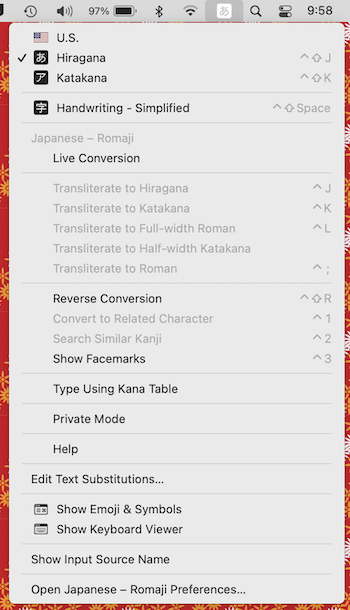
In addition, if you are learning Japanese input, things may be less confusing to begin with if you turn off the "Predictive candidates" and "Live Conversion" options. Select Hiragana from the input menu in the upper right of the computer's menu bar, then click on the input menu again and select "Open Japanese - Romaji preferences…" at the bottom. Once you get to Japanese preferences, scroll down and make sure the boxes next to "Live Conversion" and "Predictive Candidates" are unchecked. These options are descirbed in more detail below. Later you can try turning them on to see if they make things easier, but the tutorial below works best with them off.
Entering Japanese Text
Once Japanese input is enabled on your system, you can enter Japanese by typing the pronunciations on your English keyboard. Open TextEdit, the simple text processor that comes with macOS, select "Hiragana" from the input menu in the upper right of the menu bar, type kakikukeko in roman characters. You should see it converted to hiragana かきくけこ as you type.
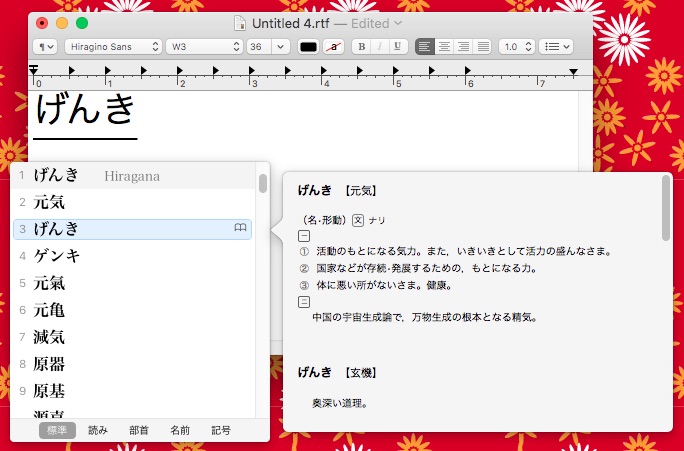
You can also enter kanji compounds by typing their pronunciation. If you type genki you'll see げんき appear in the document (with an underline). Now press space bar twice, and you'll see a pop-up window showing different kanji compounds with that pronunciation. You can cycle through them by hitting space bar, shift+space bar, or the up and down arrows. If you linger on one, you can sometimes get a pop-up window with a definition for the kanji. Highlight the one you want and press return to enter it in the document and dismiss the pop up window. Press return again (or continue typing) and the underline will disappear, indicating your choice is finalized.
For beginners, the easiest way to enter Japanese is a little bit at a time: before typing each kanji compound hit return to finalize what you've entered up to that point, then enter the pronunciation and select the correct kanji as described above, hit return again to finalize your choice, and then continue.
But when you get some more experience, you can type Japanese faster by entering a whole sentence and then hitting the space bar and letting the input system try to figure things out: it will convert the appropriate words to kanji, taking its best guess about which kanji to use, and leave other portions in kana. Then you can correct things that are not quite right and continue.
Below I've typed Tanakasanhaishadesu and hit space bar. The Mac converts this to 田中さんは医者です。(Tanaka-san is a doctor). Each segment of the sentence is underlined, and the underline beneath 田中 is darker, indicating that this is the current editing focus. If you hit space bar now, you'll get different options for "Tanaka."
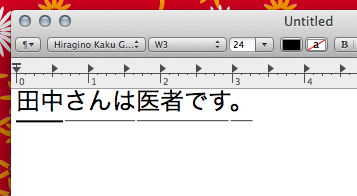
You can use the left and right arrows to change the focus so you can select a part of the sentence that was not converted correctly, and fix it.
And what if the input system did not break the segments at the right points? Suppose I did not mean "Tanaka-san wa isha desu," but "Tanaka-san haisha desu" (Tanaka-san is a dentist). I can use the right arrow key until the segment underneath さんは is highlighted, then I press shift+left arrow to shorten this segment. The system realizes that はいしゃ is one word and correctly converts it to 歯医者 (dentist).
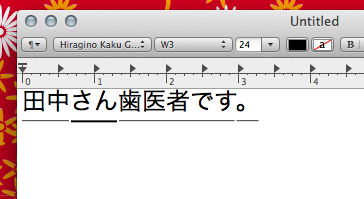
Use shift+left arrow and shift+right arrow to to shorten or lengthen each segment, then navigate to incorrect segments using the arrow keys and press space bar to fix them. So if I realize that Tanaka should be written with different kanji, I can now hit left arrow to move the focus back to 田中, hit space bar again, and select a different kanji combination, and press return. When everything is right, hit return again or just continue typing, and your choices are finalized. (The underline disappears.)
The Japanese input system adapts, remembering which compounds you choose and adjusting its suggestions next time. If you like, you can also turn "Predictive candidates." and/or "Live Conversion" back on in the Japanese input Preferences. The system then will then pop-up suggested compoundes (or go ahead and perform conversions) even before you finish typing the pronunciation. So if you type genki, you'll get a window suggesting several common words that begin that way: not only 元気 (げんき) but also 現金 (げんきん) and 言及 (げんきゅう). However, the more streamlined input pane associated with Live Conversion mode has fewer options.
Here's an optional tip: there is a keyboard shortcut to switch between languages without using the menu bar. By default it may be set to control-space bar. You can switch between the last two input methods by pressing this key combination, and holding it down it brings up a menu in the center of the screen with input options you can cycle through. (If the shortcut is not working, try setting up a shortcut yourself in the Keyboard pane of the System Preferences.)
Tricky Kana
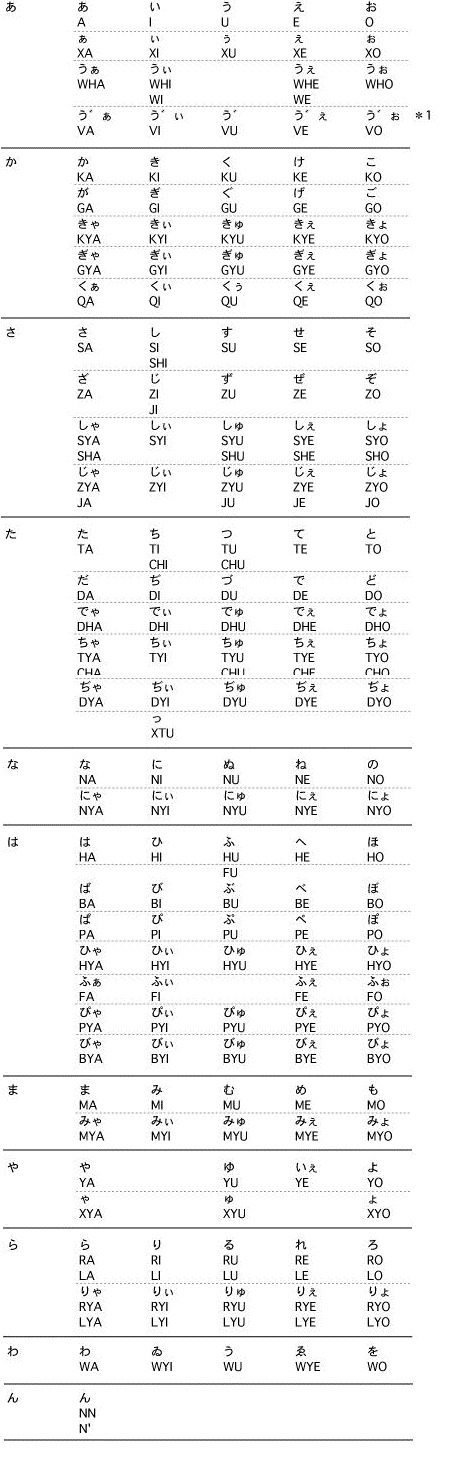
The Japanese input system can recognize different romanization systems. For example, you can enter し by typing shi or si. You can enter しゃ by typing sha or sya. There are a few kana that sometimes give folks trouble at first:
- topic particle wa (は):Type
ha - Smal tsu (っ): you can usually double the preceding consonant as you might expect. For example, for ちょっと, type
chotto. - Small kana: You can make tsu (っ) or any kana small by preceding it with an x. For example, you can get small い by typing
xi. - In some cases you may need to type a double
nnto get ん - Example: To get ファンタジー you can type
fantaji-orfuxanntaji-
There is a full chart of rōmaji equivalents buried inside the Japanese input help. (Thanks to Tom Gwekecke's Multilingal Mac blog for providing this info.)
Trackpad Handwriting Recognition
You can also enter kanji characters by writing them with your finger on a trackpad. The first page of this site describe how to enable trackpad input. Now go to the input menu in the computer's top menu bar and select "Trackpad Handwriting" Here's what it looks like:
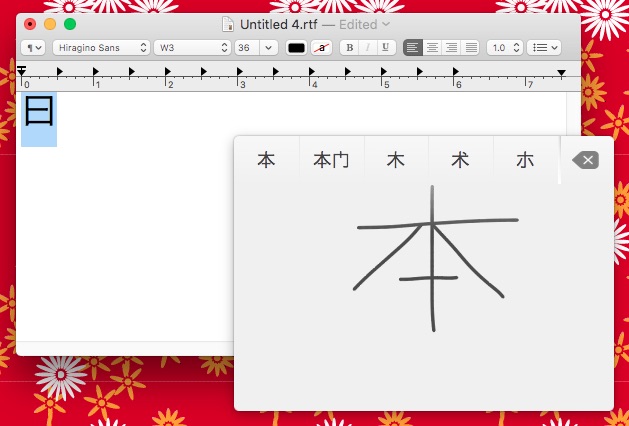
Write the character in the center of the trackpad, and then select the character you want from the choices that appear at right, by touching the corresponding point along the top edge of the trackpad. The top edge of the trackpad maps to the buttons shown. You can also stop trackpad input by pressing escape then closing the trackpad input window.
This was is orginally part of the Chinese input system, so in the past, it did not work flawlessly for inputting Japanese kanji, but recent versions of MacOS have improved things. If you use this input method extensively, switching back and forth between simplified and traditional Chinese may help when one does not work.
Other Features of the Japanese Input System
The Japanese Input System also has many other features not described here: alternate ways to enter or search for characters, the ability to register compounds not already in the default dictionary, etc. See the Japanese input menu screenshot at the top of this page for some other options, and note the "Help" item near the middle. Help for Japanese input is available in English as well as Japanese: which language you get may depend on whether you've set the Finder's menus to Japanese or English, as described on the first page of this site.
Japanese Text Editing Software
When you are ready to move beyond TextEdit to a full featured text editor, here are some options that work well for writing in Japanese.
Apple's Pages has good support for "ruby" or furigana text and some special text formatting options used only in Japanese. You may get better results if you set the document's language to Japanese: in Pages go to the "File" menu, choose "Advanced," and then "Language & Region…." I've used Pages to combine Russian, Greek, Chinese, Japanese, Arabic, and Hebrew text in a single document when creating posters for our Comparative Literature program.
Microsoft Word includes a full lineup of features for working in Japanese, including furigana, vertical text, and special search options. Go into the Microsoft Word preferences to turn these features on.
Lightway's iText Express is a free Japanese word processor with English menus and documentation. It combines the simplicity of Apple's TextEdit with some advanced Japanese support, including vertical text and Japanese manuscript (genkō yōshi) layout. The developer also produces a more powerful paid version.
Mellel is a word processor that has a long reputation for good support of non-roman languages.